
Your lunch doesn’t
need a subscription.
A photo, a quick check, and your meal is logged. Here’s why we think KcalSnap is a better fit for everyday calorie tracking on iPhone, and where the bigger apps offer more.
If you’re looking for a free MyFitnessPal alternative, start with the things you actually use. Do you want to photograph lunch, scan a yogurt, check your protein and see your weight trend? Or do you need detailed micronutrients, a fasting timer and a network of fitness integrations?
We built KcalSnap around that first routine. The reason to choose it is getting those everyday tools together without a paid plan. All three alternatives below also offer free calorie tracking. All three also offer photo logging, but put it in a paid tier. [2] [3] [4]
What’s free, what costs, what’s included.
Standard published US prices in USD, checked September 20, 2026. Annual plans are billed for the year; monthly plans are separate options. Regional prices, taxes, promotions and existing subscriptions can differ.
Scroll sideways on smaller screens to see all four apps.
| Feature | KcalSnap [1]The iPhone app | MyFitnessPal [2]Free / Premium | Cronometer [3]Basic / Gold | Lose It! [4]Basic / Premium |
|---|---|---|---|---|
| Annual price for photo logging | $0No subscription | $79.99Premium / year | $59.99Gold / year | $79.99Premium / year |
| Monthly billing option | Free | $19.99 / month | $10.99 / month | Not listed in standard pricingAnnual and lifetime plans listed |
| Free calorie diary | Included | Included | Included | Included |
| Meal-photo logging | FreeFair-use scan limits | PremiumMeal Scan, English | GoldPhoto Log | PremiumSnap It, English |
| Barcode scanner | Free | Premium | Free | Premium |
| Protein, carbs & fat | FreeTotals and profile-based targets | Basic tracking freeExtra goal controls in Premium | FreeCustom targets included | Premium for macro goals and advanced tracking |
| Voice meal logging | Not built in | Premium | Gold | Premium |
| Health & fitness connections | Apple HealthOptional, read-only context | Multiple apps and devices | Multiple apps and devices | Multiple apps and devicesAutomatic syncing in Premium |
| Fasting timer | Not included | Premium | Gold | Premium |
| Where you can use it | iPhoneNo Android app or web diary | iOS, Android, web | iOS, Android, web | iOS, Android, webSubscription access can depend on purchase platform |
Plan labels show the tier needed for that feature. This compares published features, not measured speed or accuracy. MyFitnessPal Premium+ adds meal planning at $99.99/year or $24.99/month. Lose It! also lists lifetime access at $299.99 for free accounts or a $229.99 upgrade for active paid Premium members; it regularly offers discounts. Check the actual checkout price. [2] [4]
Why we’d choose KcalSnap for everyday tracking
1. The useful shortcuts are already included.
Breakfast from a packet? Scan its barcode. A plate of food? Take a photo. The same lunch as yesterday? Repeat the meal with its saved portions. You can also search by name. Those paths lead to the same diary, without choosing a subscription first.
That is the clearest price difference from MyFitnessPal: its standard Premium plan puts photo and barcode logging at $79.99 a year. If those are the tools you’d pay for, KcalSnap gives you an alternative with no app subscription. You may still prefer MyFitnessPal’s other paid features. [2]
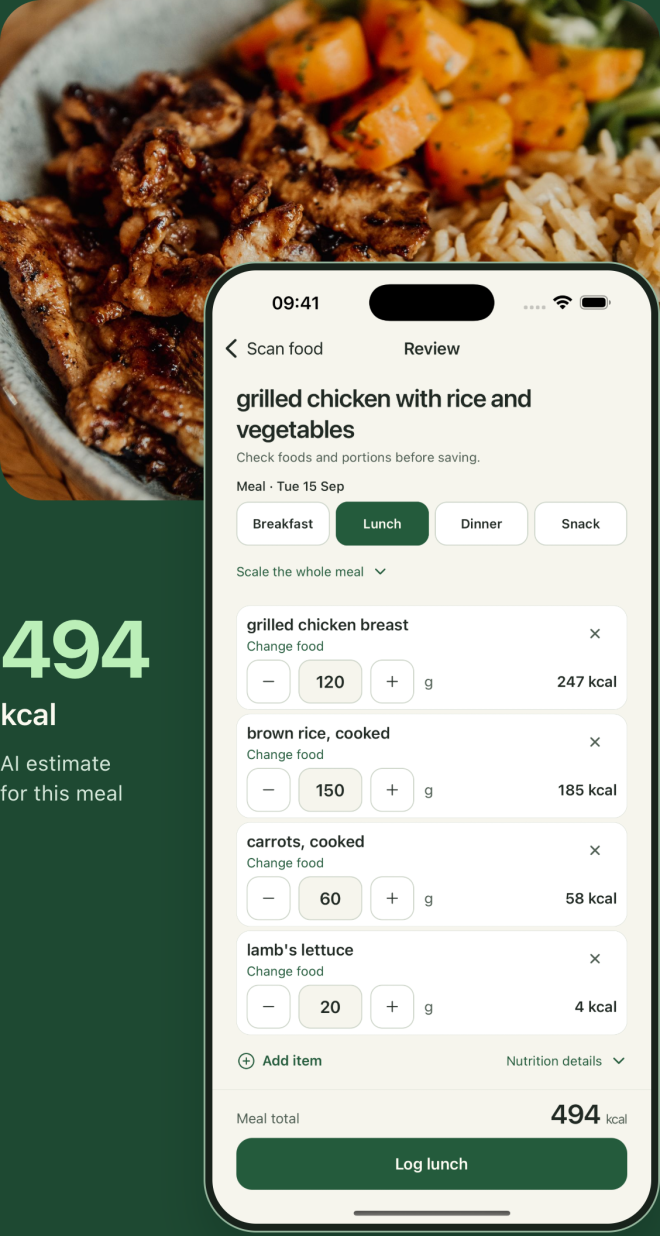
A quick review before it counts.
Check the food and portion, change a nutrition match, remove an item or add something missing. You can also describe a correction in your own words. The estimate stays editable before you save it.
2. You get a view of your week, too.
Calories and macros sit alongside your meals. Weight history and trends help you look beyond one weigh-in. Weekly Coach uses the information you’ve shared to offer a takeaway and a practical next step, with optional Apple Health activity, sleep and recovery context.
KcalSnap shows logging coverage alongside its weekly view, so an incomplete diary is easier to spot. All of this is included in the free app. English and Lithuanian are available, along with light and dark themes.
3. There’s less competing for your attention.
KcalSnap has no ads and no social feed. Its main job is to help you log a meal and understand your progress. We think that focus is a good fit if you want a smaller daily routine.
Photos are processed for analysis and are not stored by KcalSnap. Apple Health access is optional and read-only. This is a cloud-connected app: processing uses external services, and your saved diary is linked to your account. Our privacy policy explains what is processed and retained.
When another app makes more sense
A good comparison should help you choose, including when that choice isn’t us.
- MyFitnessPal: more fitness connections and meal planning.If your routine depends on its app and device integrations, established diary or recipe tools, those can be good reasons to stay. Premium+ adds a meal planner. KcalSnap doesn’t offer an equivalent planner or that breadth of connections. [2]
- Cronometer: more detail about nutrients.If you want to track vitamins and minerals, Cronometer is the stronger fit. Its free plan includes detailed nutrient tracking, custom targets and a barcode scanner. Gold adds photo and voice logging, custom charts and Crono Coach. KcalSnap focuses on calories, protein, carbs and fat. [3]
- Lose It!: a broader weight-management toolkit.Lose It! combines a free calorie budget with community features. Premium adds tools such as fasting, custom nutrient goals and future meal logging. It also offers a lifetime purchase option. Those extras may matter more to you than KcalSnap’s simpler scope. [4]
- Any of the three: Android or a web diary.KcalSnap’s consumer app is for iPhone. If you need to log from Android or your laptop, the alternatives above support those platforms. Some mobile features and subscription benefits differ by platform.
A small test beats a long feature list.
Try a meal you know well. Review the foods and portions, save it, and check your day’s totals. Repeat a familiar meal tomorrow. If that routine gives you what you need, paying for a bigger toolkit may add little to your day.
That is our case for KcalSnap: the photo, barcode and progress tools many people want, together in a free iPhone app.
A few practical questions
Is KcalSnap free, or just a free trial?
The iPhone app is free, with no paid app plan or trial expiry. Photo analysis has daily fair-use and shared capacity limits; it is not unlimited. The separate paid developer API is for integrations and is not needed to use the app.
Can I try it before creating an account?
Yes. You can try up to three meal-photo scans and review the estimates before signing in. Saving a meal to your diary requires an account.
Does MyFitnessPal have a free barcode scanner?
Its published US plan comparison lists barcode scanning under Premium. Regional availability and existing account entitlements can differ. KcalSnap and Cronometer include barcode scanning in their free apps. [2] [3]
Can I import my old MyFitnessPal diary?
KcalSnap does not currently include a MyFitnessPal diary importer. You can start logging new meals, but your existing history will not transfer automatically.
Sources and how we compared
Checked September 20, 2026 against the publishers’ own pricing, support pages and store descriptions. We distinguish included free features from paid upgrades, and compare standard US pricing rather than introductory offers. App recommendations are our editorial judgment.
- KcalSnap. Current App Store listing, feature and fair-use support notes, and privacy policy. Features also checked against the shipped app implementation.
- MyFitnessPal. Membership tiers and US prices, Premium features and platform availability, Meal Scan requirements, and Free and Premium comparison.
- Cronometer. Published monthly and annual Gold prices, Gold features, and Basic plan features.
- Lose It! Standard annual and lifetime prices, Discount and platform notes, Photo logging requirements, Free and Premium feature guide, and App Store feature list.
Written by KcalSnap’s builder and published by MB Nexus consulting. This is a product comparison from the team behind KcalSnap. We do not receive affiliate commissions from the other apps linked here. Product names belong to their respective owners. Spotted a change? Let us know.